Quick answer: iPhone has two built-in ways to block apps — Screen Time App Limits (Settings → Screen Time → App Limits) and Downtime. Both work until you tap "Ignore Limit." For a block you can't dismiss with one tap, use a Screen Time-based blocker like FocusFirst that shields apps until you've earned time to open them.
Method 1: Apple Screen Time App Limits (free, built in)
Apple's own tool is the right place to start:
- Open Settings → Screen Time and turn it on if you haven't.
- Tap App Limits → Add Limit.
- Choose a category (like Social) or expand it to pick specific apps.
- Set a daily time limit and tap Add.
When the limit is reached, the app greys out with an hourglass. It's free, private, and takes two minutes to set up.
The catch: the block screen includes an Ignore Limit button — "One more minute," "Remind me in 15," or "Ignore for today." Most people learn to tap it without reading it within a week. A limit you can dismiss in one tap isn't a limit; it's a speed bump.
Method 2: Downtime
Downtime (Settings → Screen Time → Downtime) blocks everything except apps you allow, on a schedule — useful for sleep hours. But it's all-or-nothing by time of day, and the same one-tap bypass applies.
Method 3: Delete the apps
Honest, drastic, and it works — for a while. Most people reinstall within days because the underlying habit hasn't changed, and some apps (like Safari-accessible sites) can't really be deleted away. Deleting treats the symptom without replacing the habit.
Method 4: A blocker with real friction — the earned-time approach
The reason limits fail isn't that you're weak; it's that the exit is free. Change the price of the exit and the behavior changes.
FocusFirst uses Apple's Screen Time framework — the same shielding technology as App Limits — but replaces "Ignore Limit" with a trade:
- Block your distracting apps. In FocusFirst's Focus Engine, add the apps, categories, or websites you want shielded. The shield stays on by default.
- Pick your focus apps. Study tools, reading apps, language learning, work — time spent in them earns scroll time at a rate you set (for example, 10 minutes of focus earns 3 minutes of scrolling).
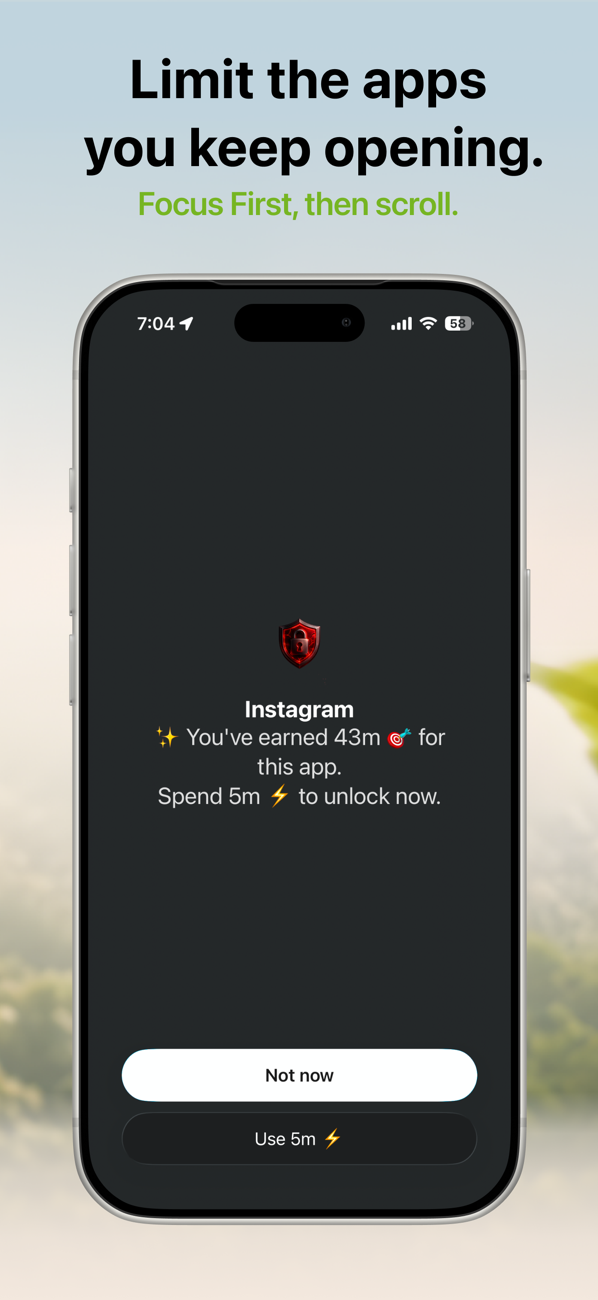
- Spend earned time to unlock. When you open a blocked app, the shield shows your balance — "You've earned 43m. Spend 5m to unlock now." — with two honest options: Use 5m or Not now.
There is no free bypass to build a habit around. Either you've earned the time and spend it guilt-free, or you haven't — and the app you were about to lose an hour to gets a "not now" instead.
Which method should you use?
- Light problem (occasional overuse): Apple's App Limits are enough.
- Scheduled quiet hours: Downtime.
- You keep tapping Ignore Limit: you need friction with no free exit — that's the earned-time model.
- Compulsive loop (open app → close it → open it again 40 times a day): blocking alone won't fix it; you need blocking plus a replacement behavior. That's exactly what earning time from focus apps provides.
Try it: FocusFirst requires a subscription or one-time Lifetime purchase — block your distracting apps, set your earning rate, and start your first focus session today. Get FocusFirst for iPhone →